

GestureWatcher
Overview
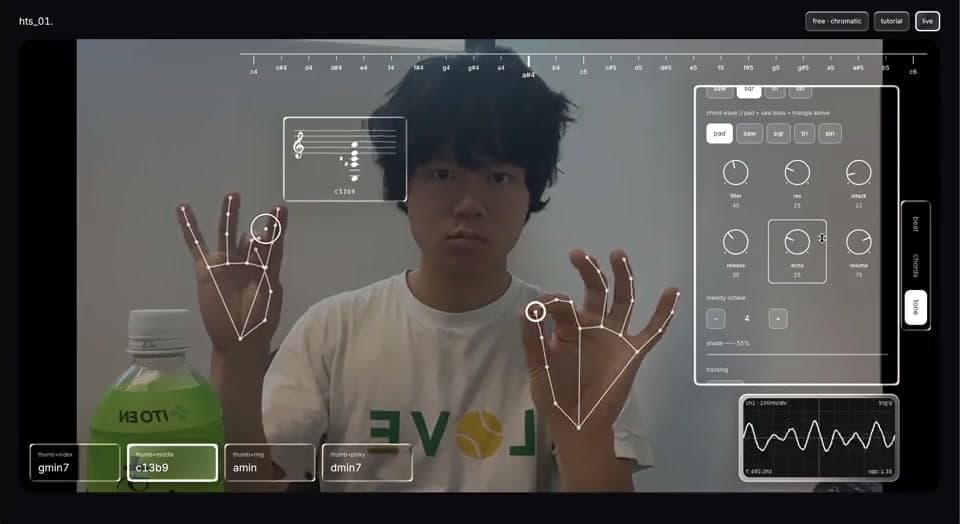
hts_01 is a synthesizer you play with your hands. Right hand plays melody, left hand plays chords, and an 8-bit drum machine keeps time. All of it runs from a webcam, entirely in the browser; the video never leaves your machine.
Hand tracking stopped being exotic a while ago. MediaPipe runs 21 landmarks per hand at frame rate in a browser tab. What hasn't arrived is a reason to use it. Almost every hand-tracking demo is the same demo: you wave, a cursor moves, you poke a button, you close the tab. A mouse has detents, friction, and a surface. A hand in the air has none of them. The hard part isn't detecting a pinch; it's designing controls for a surface that doesn't exist.
I started with three demos and deleted all three
The first version was a gesture playground: a layout builder, a node-graph editor, and an Iron-Man-style HUD. It looked great in a screenshot. I played with it for a few minutes and deleted all three. Every one was the same interaction with a different skin: point your hand at a button and pinch. A mouse does that better, and nothing got more interesting the second time.
An instrument was the right target because instruments assume you'll be bad at first. It's allowed to take practice.
Each dead end died of something specific
Vertical pitch sliders went first. Pitch on the Y axis meant holding an unsupported arm up in front of your face to play high notes. They became a horizontal ruler along the top that your hand reads like a keyboard.
Pitch bend on sideways drift died the first time I played it seriously, because I couldn't tell whether I was out of tune or the app was. I deleted bend entirely and adopted a rule: the note on screen is exactly the note you hear. An instrument that can lie to you is worse than one that does less.
The frosted-glass panels cost me more than anything else in the project: 25 of my 42 commits mention the glass. A drop-in library assumed Tailwind and painted ghost boxes over the UI. An SVG-filter approach died when the CSS minifier silently stripped it in production. What stuck is a 4-pass WebGL renderer: refraction, dispersion, fresnel, glare. To tune it I built a standalone glass lab with every parameter on a slider, because the app was the wrong place to judge a material.
And one five-minute revert. MediaPipe's docs say the handedness labels assume a mirrored image, so I swapped them and felt clever. Then I raised my hands and melody was on the left. The docs were right about the API and wrong about my setup.
The hardest control to design has no surface at all
The main control: your left wrist angle sweeps the filter. Rotate your hand and the sound opens up. The naive version is one line of math, and it's unusable. Every problem with it comes from the hand floating in the air.
There is no "off"; your hand is always at some angle. So straight up became a true neutral, with a deadzone where the sound sits exactly where the knob left it. The knob and the hand fight over one value, so the knob sets a base and your hand modulates around it. Wrist roll also turns knobs, so tilt re-arms only after passing back through neutral; whichever interaction consumes the signal owns it. And a hand hanging at rest sits exactly where the sign flips, so past 150° reads as a resting posture, not a playing one.
One bug only showed up because I measured it. I'd smoothed the tilt with a rolling average, which is standard practice, but the gesture loop skips frames when a hand holds still, so a held 60° tilt settled at 0.216 instead of 0.770. Smoothing had to move out of the gesture layer and into the audio engine.
Four gestures carry the whole instrument
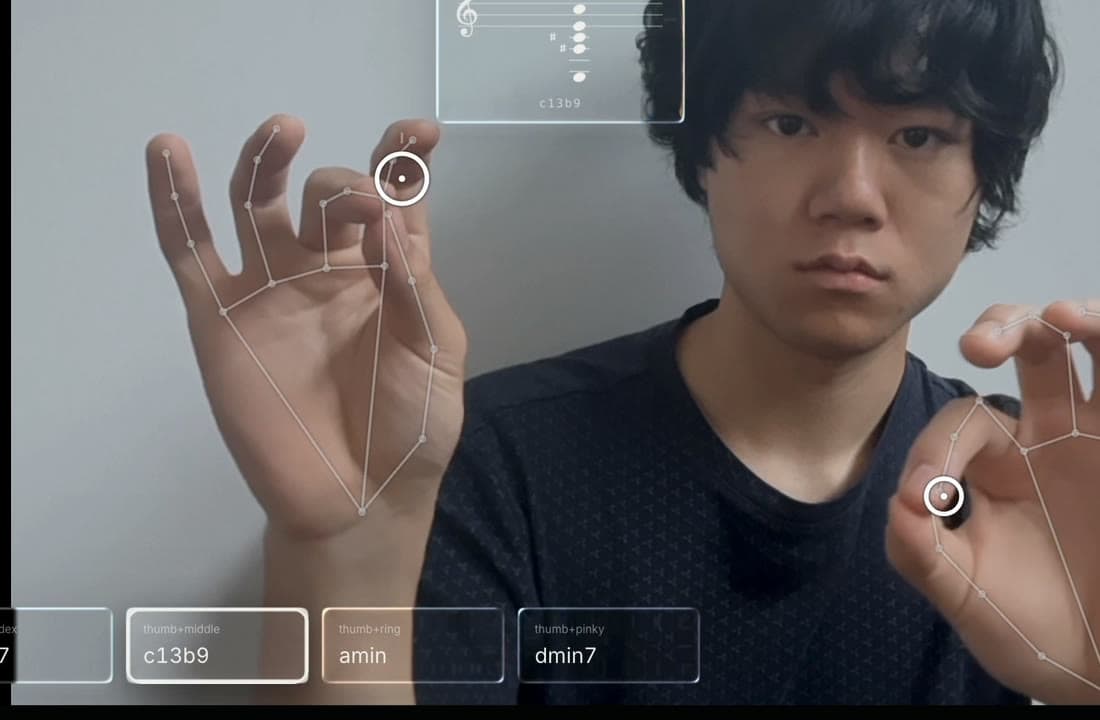
Chords live on your fingertips: touch thumb to index, middle, ring, or pinky for chord slots 1–4, with a floating staff card showing the actual notes. Melody is a keyboard drawn in the air: three fingers, three ways to play, with hand position along the top ruler picking the pitch. Chord voicings are editable per note on a two-octave keyboard, and the chord names itself back to you.
Everything is also a mouse. Every control works with a pointer, which is how the app stays testable and how anyone without a camera can still play it.
Raw landmarks jitter, so every cursor runs through One-Euro filtering, and pinch detection uses hysteresis so a drag never flickers apart mid-screen. Vite, React 19, TypeScript, @mediapipe/tasks-vision. Zero backend.
What I'd carry into any product
In gesture UI, test with your body, not the docs. Five seconds of raising my hands caught what re-reading never would have.
A control that can lie is worse than a control that can't move. Pitch bend was expressive, but I stopped trusting the notes, so it went. And continuous input needs arbitration, not modes: when one signal serves two purposes, whichever interaction consumes it owns it. Nothing to toggle, nothing to remember.